Create class diagram of your code
Table of Contents
Visualize Your Code with Class Diagrams #
Visualizing your code in the form of class diagrams can be incredibly useful, especially when you need to present a simplified version of your code to others. Class diagrams provide a graphical representation of the structure and relationships within your codebase, making it easier to understand and communicate complex code designs. In this article, we’ll explore how you can automate the process of generating class diagrams using a simple script.
What is a Class Diagram? #
A class diagram is a type of Unified Modeling Language (UML) diagram that represents the structure of a system or software application. It focuses on the classes, their attributes, and the relationships between them. Class diagrams are widely used in software development to visualize the static structure of code, making it easier to comprehend the overall architecture and design.
Steps #
Follow these steps to generate class diagrams for your code:
First, ensure that you have Homebrew (brew) installed on your computer. If you don’t have it installed, you can visit install brew and follow the installation instructions.
Once you have brew installed, open your terminal and run the following command:
brew install swiftplantuml
Generate the graph #
Navigate to the root folder of your project using the terminal and execute the following command:
swiftplantuml
This command will analyze your codebase and generate a class diagram representing the structure and relationships of the classes in your project.
Review the results #
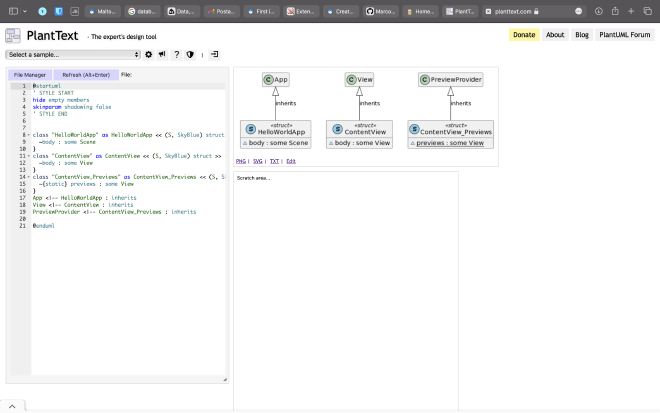
The generated class diagram will open in your default web browser. Take some time to explore and analyze the diagram. You will see the classes, their attributes, and the associations between them. This visual representation will help you gain insights into your codebase and understand its organization.
You can also modify the diagram as per your requirements. Add or remove elements, adjust the layout, or highlight specific relationships to improve the clarity of the diagram.
Once you are satisfied with the class diagram, you can export it in various formats, such as PNG, SVG, or PDF, depending on your needs. Sharing the diagram with your team or stakeholders can aid in code documentation, code reviews, and collaborative discussions.
Result #
The result will be like this
Conclusion #
Class diagrams are powerful tools for visualizing the structure and relationships within your codebase. By automating the process of generating class diagrams using the swiftplantuml script, you can quickly and effortlessly create informative visual representations of your code.
These diagrams help you and your team gain a better understanding of the code’s architecture, dependencies, and relationships. This enhanced comprehension can lead to improved code design, easier maintenance, and more effective collaboration.
Start leveraging the power of class diagrams in your software development process. Generate class diagrams for your codebase and unlock the benefits of visualizing your code’s structure.